Multi-Currency Personal Finance

One private ledger for every account and currency you hold. No bank linking. Ask your money questions in plain English.

Built for expats, cross-border households and anyone paid in one currency and spending in another.

No bank linking · Free: two accounts in up to two currencies · See plans

MoneyHome dashboard showing a USD-led US household's net worth, liabilities, cash, monthly cash flow, upcoming payments and budgets
Accounts, totals and budgets in one viewSample data

See five currencies in one total

Five currencies. One net worth.

Every account keeps the currency you hold it in. Pick a base currency and each line and the total re-express together.

Sample rates per 1 USD EUR 0.90, GBP 0.75, HKD 7.80, MYR 4.00.

The free plan covers up to two currencies, so you can try this with your own accounts. Unlimited currencies are part of Premium and Founding Supporter. Start free

Sample household accounts, each in its own currency and in the chosen base currency
AccountOwn currencyIn USD
US checkingUSD$12,400.00$12,400.00
Hong Kong savingsHKDHK$78,000.00$10,000.00
Malaysia savingsMYRRM18,400.00$4,600.00
Euro accountEUR€9,000.00$10,000.00
UK savingsGBP£6,000.00$8,000.00
Net worthin USD$45,000.00
Sample data and sample rates. The app converts with daily exchange rates.

A quick tour of the view you get.

The dashboard, searchable ledger and budget history, in a 38-second narrated tour.

38 seconds · sound is off until you choose play

Sample data throughout. Voice and music play only when you start the tour.

Accounts, transactions and budget history.

Check account balances, search transactions and compare budgets across months.

Every account. One view.

The dashboard puts net worth, liabilities, cash flow, upcoming payments and budgets together. Account groups stay visible while you compare balances.

  • Account totals Keep balances and upcoming payments together.
  • Income and cash flow Compare income and spending across months.
MoneyHome dashboard with Chase Checking, Ally Savings, account context and cash flow widgets
Dashboard · sample data

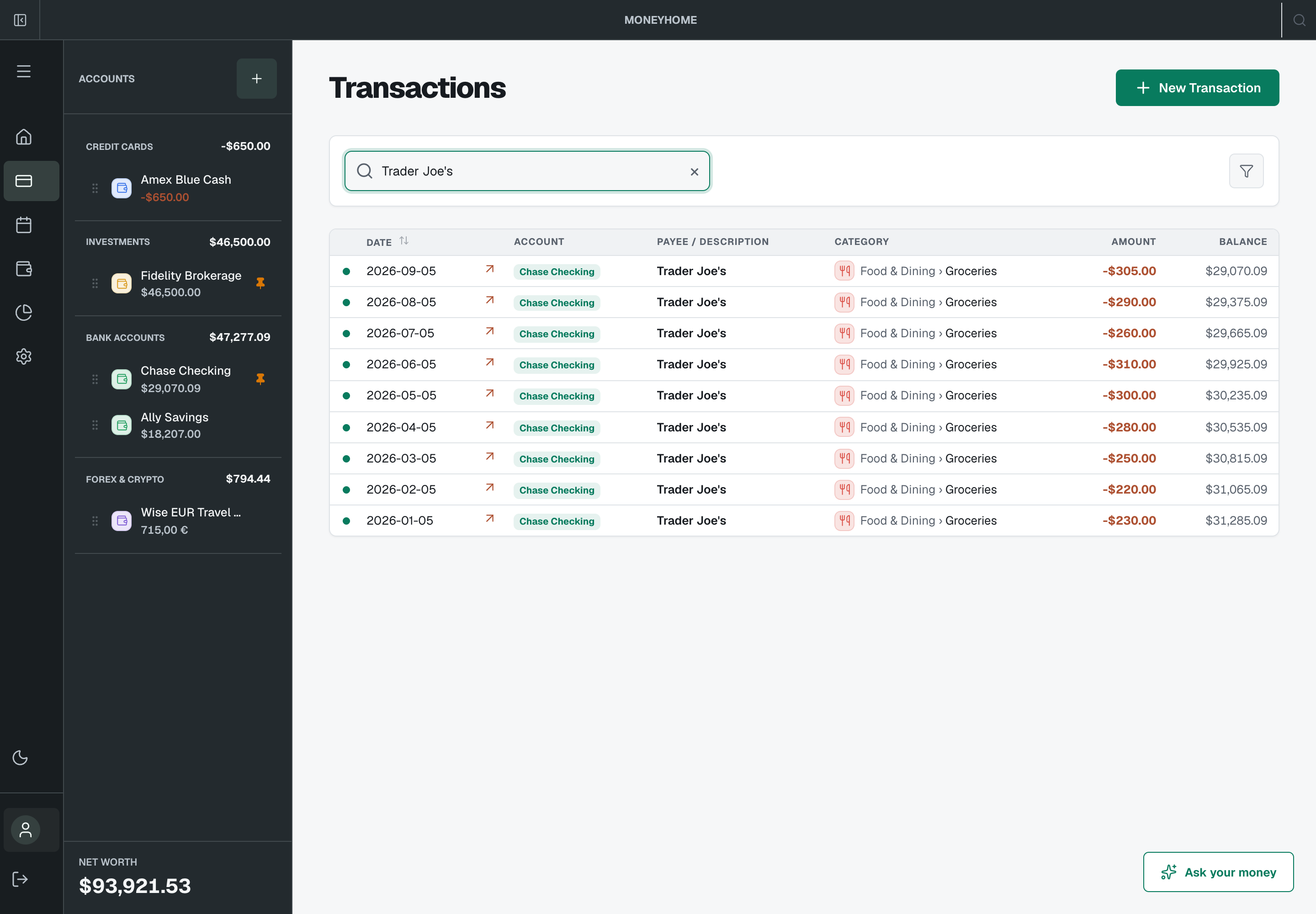
Find the transaction.

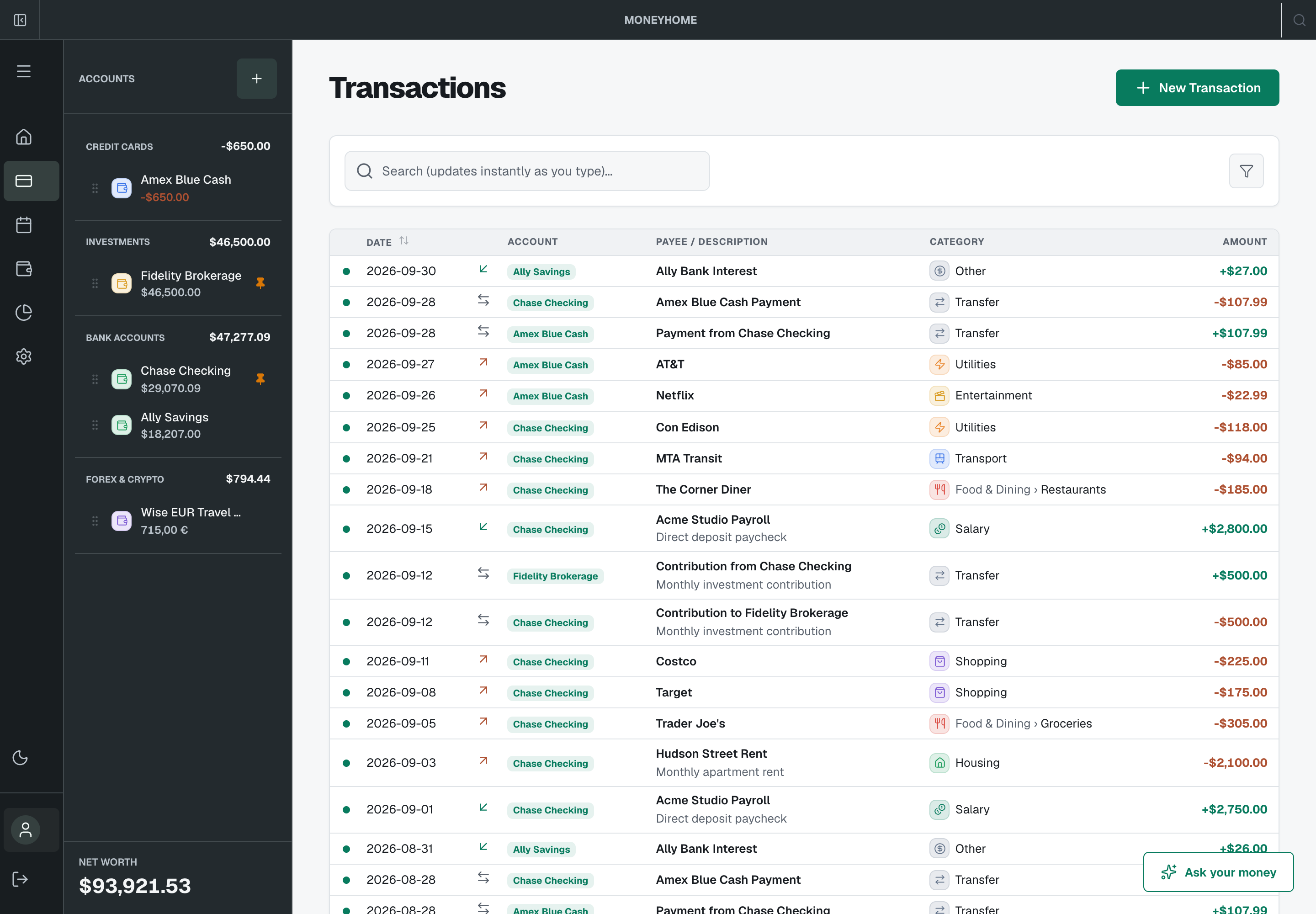
Search the ledger across accounts and currencies. The list keeps date, account, payee, category and amount in view so the result still has context.

  • Searchable ledger Search updates as you type.
  • Expense detail See the amount, payee and category in the same row.
MoneyHome transactions page with a searchable US ledger and USD amounts
Transactions search · Trader Joe's · synthetic sample data

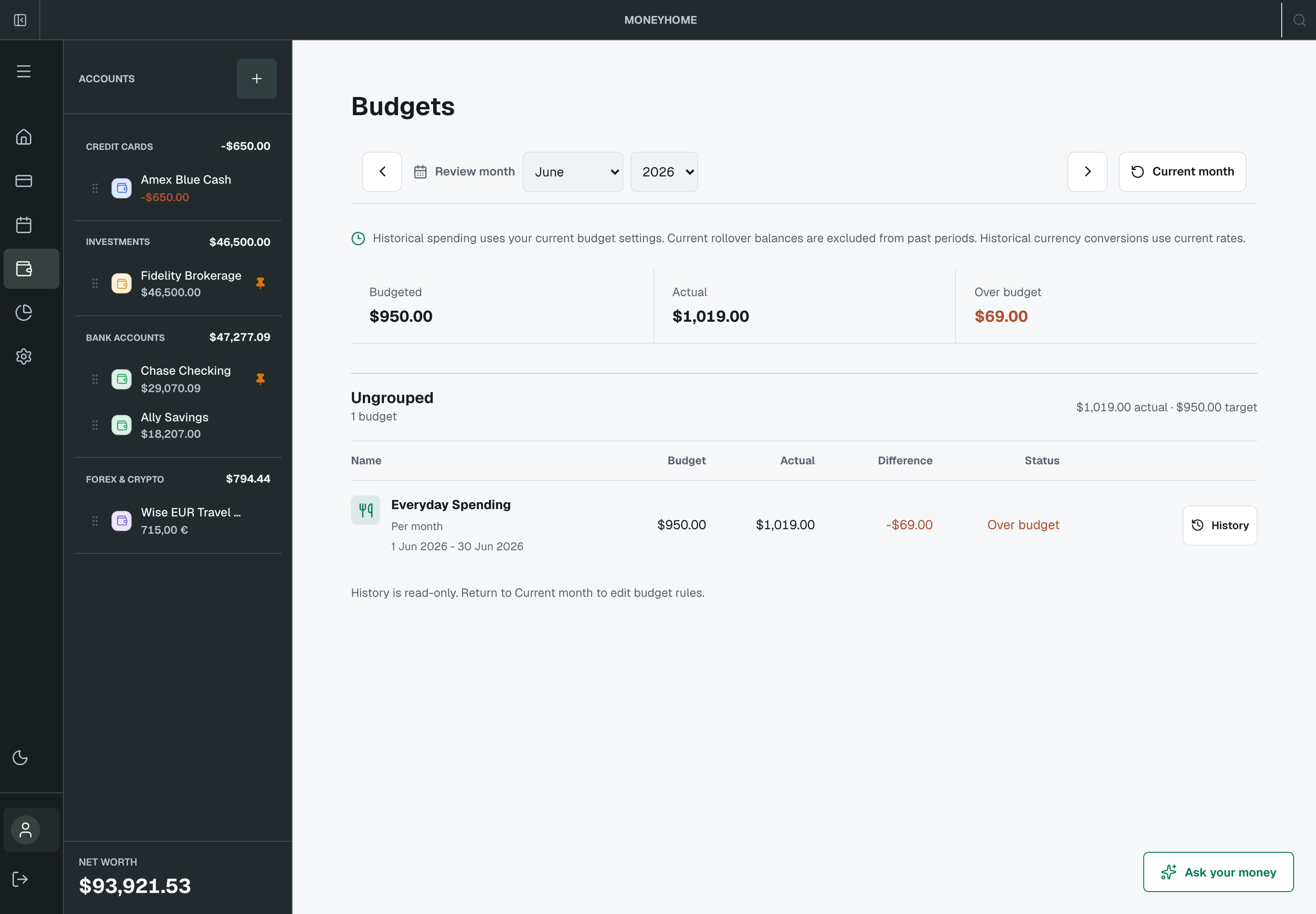
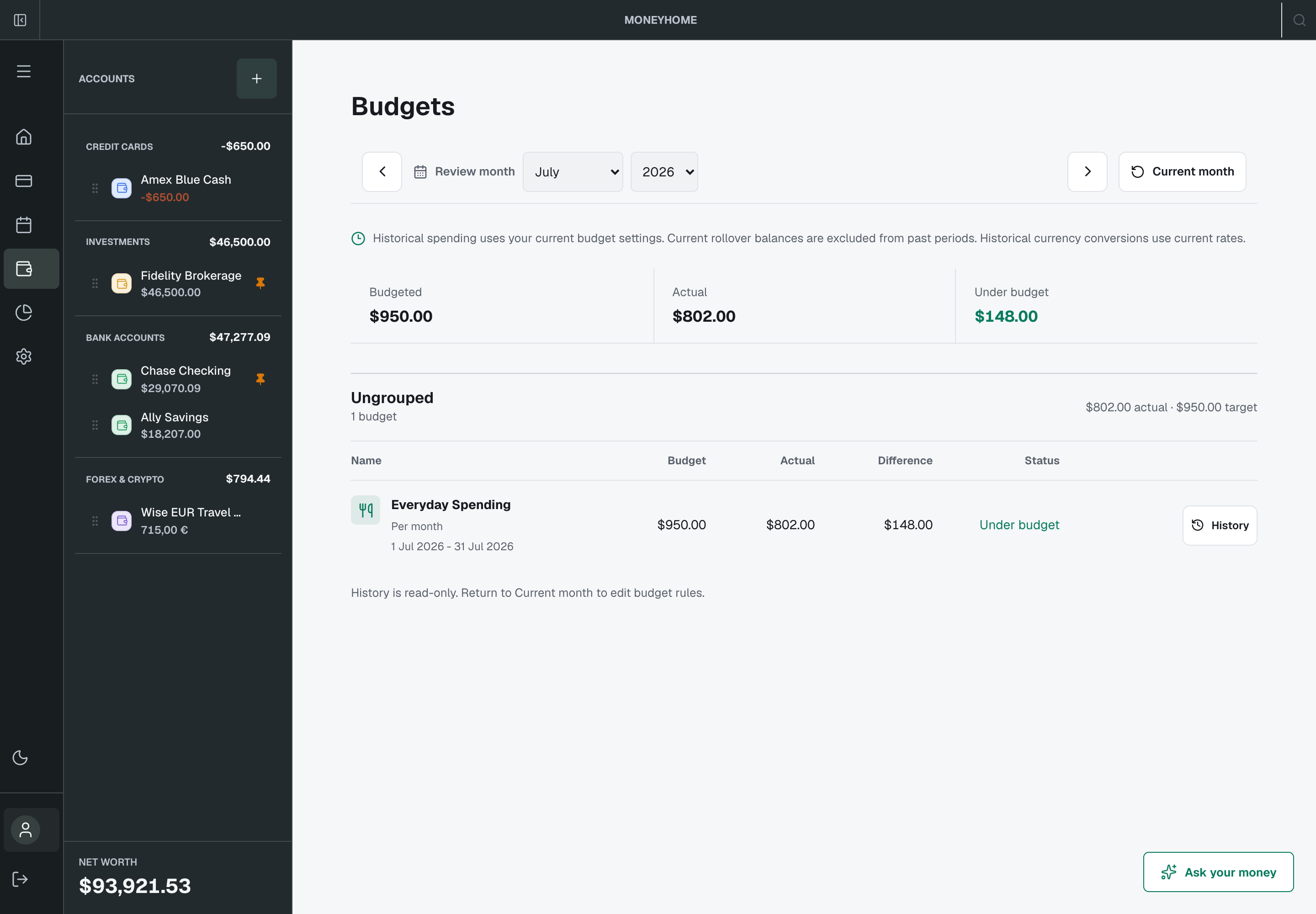
Review every month.

Go back to any month in your ledger and see the target, actual spending and difference. Review a whole year or select an exact budget period.

  • Under budget See how much remains against the target.
  • Over budget See exactly how much spending went over.
June 2026 $950 target $1,019 actual $69 over
July 2026 $950 target $802 actual $148 under
Synthetic sample data · historical results use current budget settings and FX. Past rollover balances are not stored.

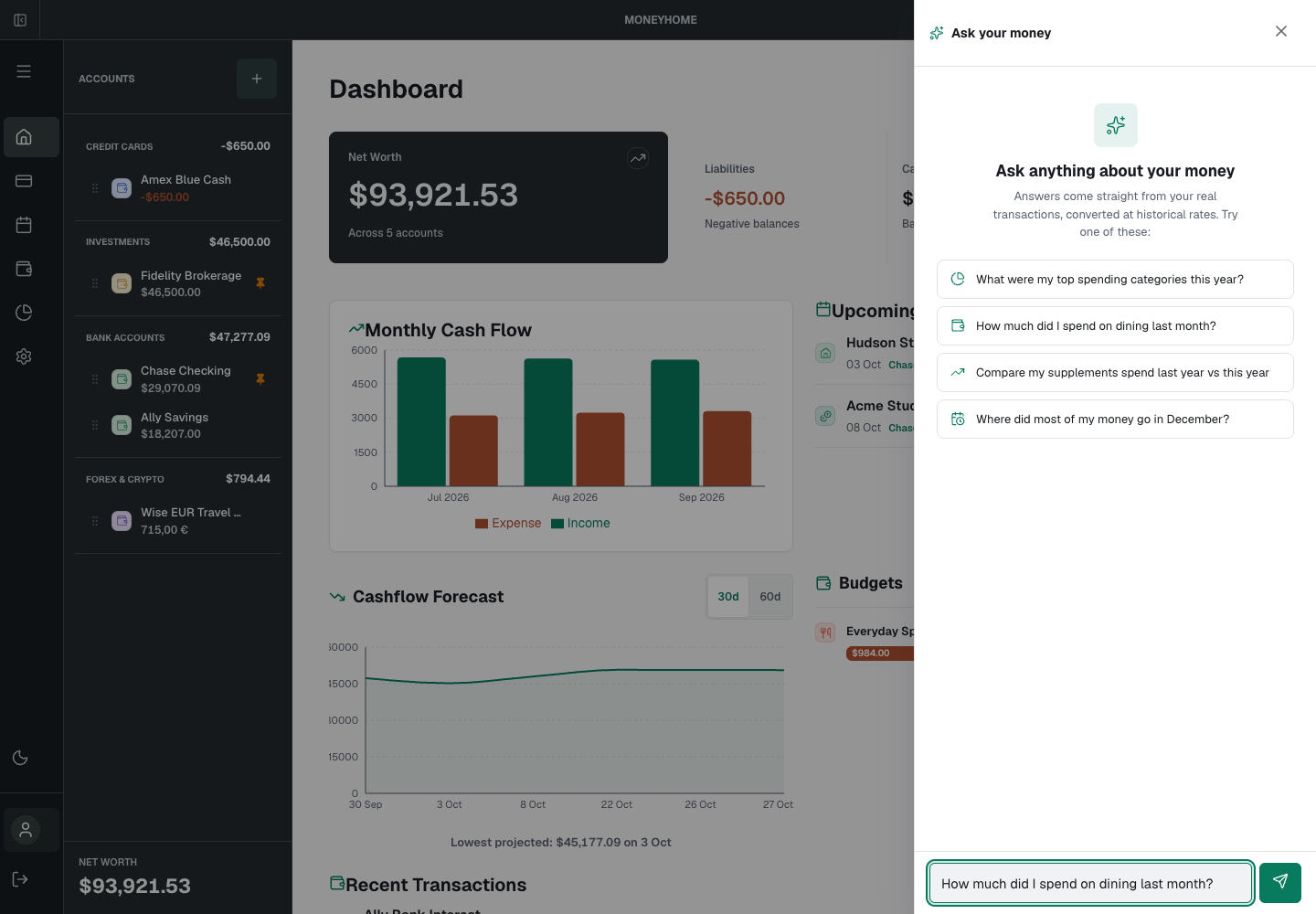
Ask your money in plain English.

Type a question about your own ledger, or tap one of the examples. Answers are drawn from your transactions and converted at historical rates.

  • On paid plans Premium and Founding Supporter include hosted AI, or you can use your own AI key. The free plan has no AI.
  • What is sent When you ask, the relevant ledger data goes to the selected AI provider so it can answer.
  • Check the answer AI answers can be wrong or incomplete. Look before you act on one.
MoneyHome Ask your money panel with example questions listed and the question How much did I spend on dining last month typed into the box, ready to send. No answer is shown.
Ask your money, with a question ready to send · sample data

At your desk or on your phone.

A responsive web app you can install from your browser.

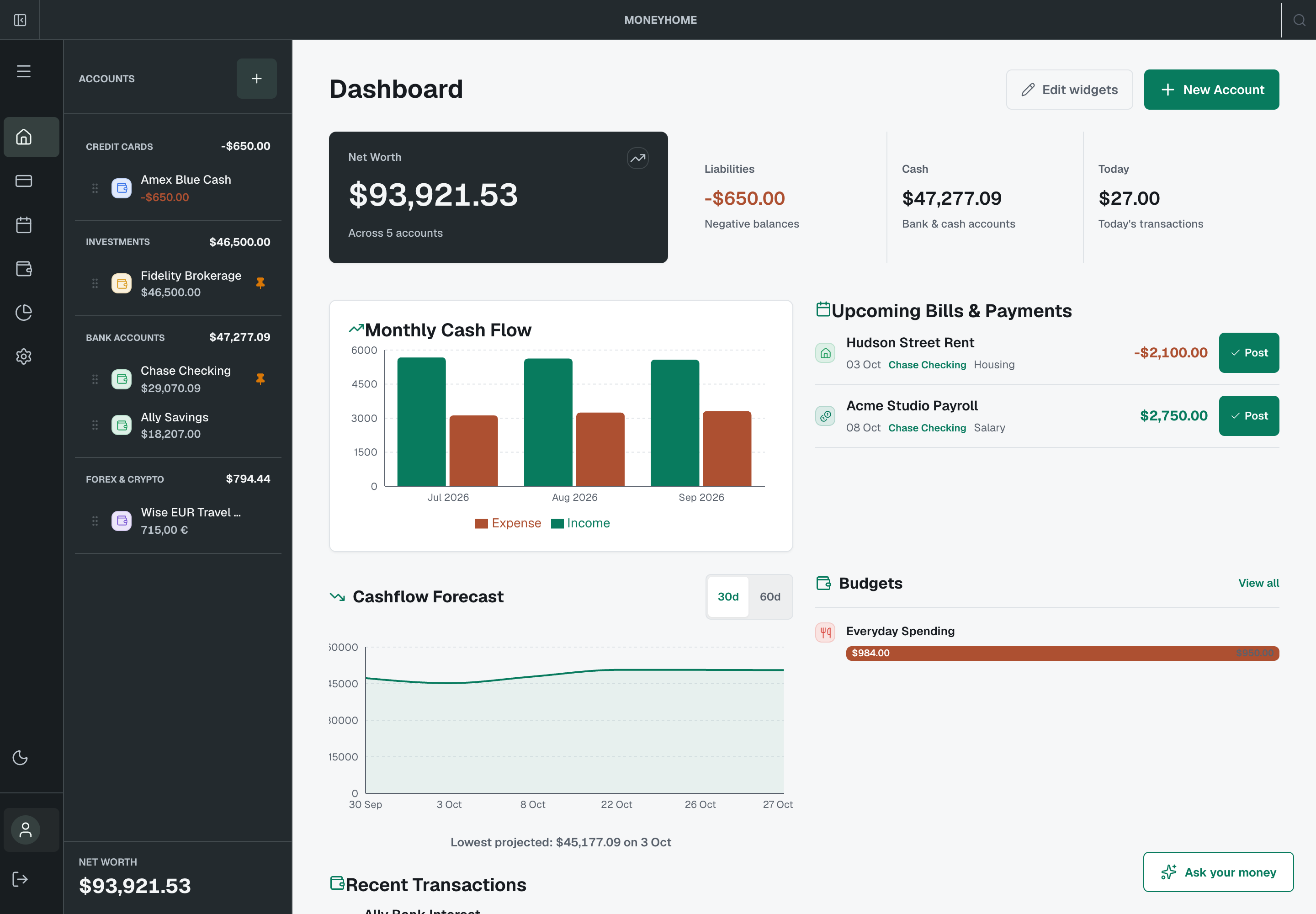
MoneyHome dashboard on desktop for the same USD-led US household
Desktop dashboard · synthetic sample data
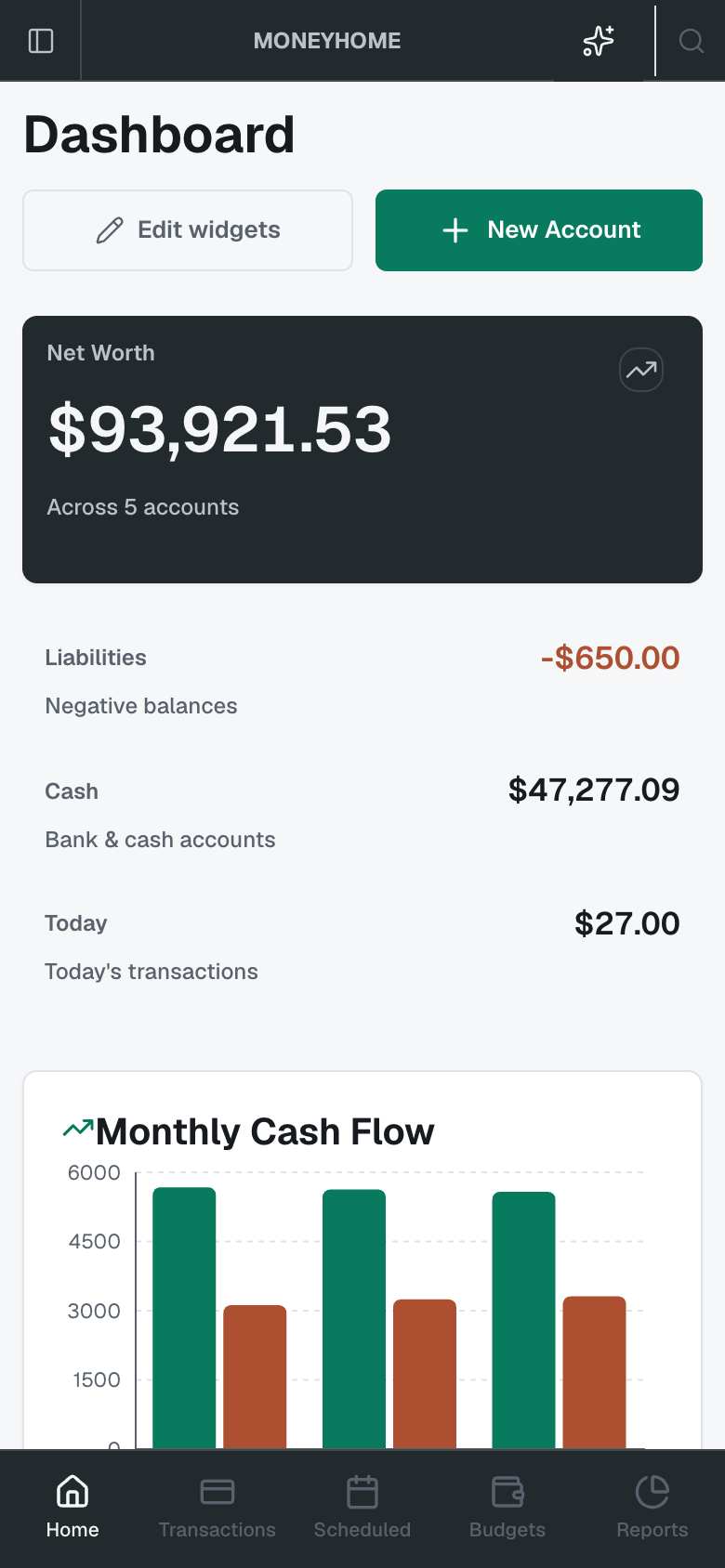
MoneyHome phone view for the same USD-led US household
Phone view · synthetic sample data

Who MoneyHome is for.

If your money does not live in one place or one currency, this was made for you.

Accounts in more than one country

Keep a US checking account, a Hong Kong savings account and a euro balance in one ledger, each in its own currency.

Paid in one currency, spending in another

Record money as it moved and see your total in the currency you think in.

Leaving an app tied to one platform

Import a CSV from your bank or your old app, and export your transactions as CSV whenever you like.

No bank login for a third party

MoneyHome does not connect to your bank. You decide what goes in.

Not the right fit if you want transactions pulled in from your bank automatically. MoneyHome does not link to banks, so you add or import them yourself.

How it compares.

General categories only. Apps in each category differ, so check the one you use.

Scroll the table sideways to see every column.

MoneyHome compared with bank-linked budgeting apps and with a spreadsheet
FeatureMoneyHomeBank-linked budgeting appsA spreadsheet
Several currencies in one ledgerYes. Free covers two currencies, Premium and Founding Supporter have no limit. Each account keeps its own currency.Varies. Many are built around one main currency.Possible, but you keep the rates and formulas up to date yourself.
Bank login neededNo. You add transactions or import a CSV.Often, to pull transactions in. Some also allow manual entry.No.
Transactions arrive by themselvesNo. You enter or import them.Often, once accounts are linked.No.
Questions in plain EnglishYes, on paid plans, with hosted AI or your own AI key.Varies by app and plan.Not built in.
Works on any deviceYes, in a modern browser, and it can be installed from the browser. No native apps.Often, through a website and native apps. Varies.Depends on the spreadsheet app you use.
Budgets and reports built inYes. Core reports and budgets are on the free plan.Usually.You build them.
Your data exportYes. Export your transactions as CSV from Settings, on every plan.Varies. Some limit what you can export.Yes, it is your file.

Your entries stay in your private account.

MoneyHome does not connect to your bank. You add or import the information you want to track, then choose how AI helps with it.

No bank linking

There is no bank login connection here. Add transactions manually or import a CSV.

Private account data

Your finance records are stored in your MoneyHome account and remain available for you to export or delete.

Hosted AI on paid plans

Paid plans include hosted AI. Relevant ledger data is sent to the selected AI provider when you ask a question.

Optional BYOK

You can bring your own AI key instead. Those requests use the provider account and limits you choose.

Start free. Upgrade for more accounts, currencies and AI.

Free includes two accounts in up to two currencies. Unlimited currencies and AI are paid features.

Prices in USD, billed via Stripe. Any applicable tax and the final total are shown before you confirm.

Free forever

Free

$0
No card required

A complete starting ledger: two accounts, up to two currencies.

  • Manual entry and CSV import
  • Two accounts with synced access
  • Up to two currencies, with converted totals
  • Core reports, budgets and export
  • No AI assistant
Create free account

One-time payment

Founding Supporter

$149 once
No renewal

Own today's app for life with a one-time payment.

  • Premium app features
  • Hosted AI included, 20 questions per day, or optional BYOK
  • One-time payment with no subscription renewal
  • Today's app, yours forever
  • Locked founder rates on future add-ons
  • Numbered founding-member badge
Get Founding Supporter

Premium renews until you cancel; access continues through your paid period. Founding Supporter does not renew. It covers today's app; major future add-ons may be offered separately at locked founder rates. Hosted AI allowances are a current benefit, not a lifetime inference guarantee. BYOK requests use your provider account at your own cost. See Terms for refunds and lifetime coverage.

Why I built it.

I have tracked every dollar I spend for more than 20 years. The tools I started with were discontinued or stopped improving, and most newer apps handle one currency well and the rest badly. My own accounts sit in several currencies, so I built the app I wanted.

The founder of MoneyHome
hello@moneyhome.app

Questions people ask.

Is MoneyHome free?

Yes, there is a free plan and it needs no card. It includes two accounts in up to two currencies, manual entry, CSV import, core reports, budgets and CSV export. It does not include AI. Premium is $8 a month or $72 a year and adds unlimited accounts, unlimited currencies and hosted AI. Founding Supporter is a one-time $149.

Can I hold accounts in more than one currency on the free plan?

Yes, in up to two. The free plan lets your accounts use two currencies, for example the one you are paid in and the one you spend in, with totals shown in the base currency you choose. A third currency needs Premium or Founding Supporter, which have no currency limit.

Do I have to link my bank?

No. MoneyHome does not connect to your bank and never asks for your bank login. You add transactions by hand or import a CSV file, so transactions do not arrive on their own.

Can I import from my bank or another app?

Yes, if it can export a CSV. The importer works with any CSV file. It detects common column names and lets you map the rest by hand. It can read a currency column and three date formats, it skips duplicates if you import the same rows twice, and it accepts files up to 10MB. Split a larger export by date range.

Where do the exchange rates come from?

Current rates are refreshed daily from a public exchange-rate feed. For past dates, reports and AI answers use European Central Bank reference rates, which are published on business days, so a weekend date uses the latest earlier rate. These are reference rates, not what a bank or card network will charge you.

How does the AI work, and what does it see?

Ask your money is on paid plans. You can use the hosted AI that comes with Premium and Founding Supporter, or bring your own key for Gemini, OpenAI, Anthropic, OpenRouter or DeepSeek. When you ask a question, the relevant part of your ledger, such as matching transactions and balances, is sent with it to the AI provider that answers. Hosted AI uses Google's Gemini API. Your own key is stored only in your browser. AI answers can be wrong, so check them before you act.

Can I export or delete my data?

Yes. From Settings you can export all your transactions to a CSV file at any time, including on the free plan. You can also delete all your data and keep your sign-in, or delete your account entirely. Neither can be undone. If you have ever paid, a record of the payment itself is kept for accounting.

What about cancelling and refunds?

You can cancel Premium at any time. That stops the next renewal and you keep access until the end of the period you paid for. Part-used periods are not refunded. Founding Supporter is refunded in full if you email hello@moneyhome.app within 14 days of purchase. A duplicate charge, or a charge after you cancelled, is refunded too.

Does it work on my phone? Is there an app?

MoneyHome is a web app. It works in a modern browser on desktop and phone, and you can install it from your browser. There are no native iPhone or Android apps.
Start with the money you already manage.

Create a free account and add or import your records. No bank linking required.

Already have an account? Sign in